The agent team that multiplies your team 10x.

ENSO OS ships with agents, skills, and chains already built. You assign, they execute, you approve. The work gets done. And stays learned.

Recorded from the real product, no mockups.

HOW WORK GETS DONE

Assign work to an agent the way you'd assign it to a teammate.

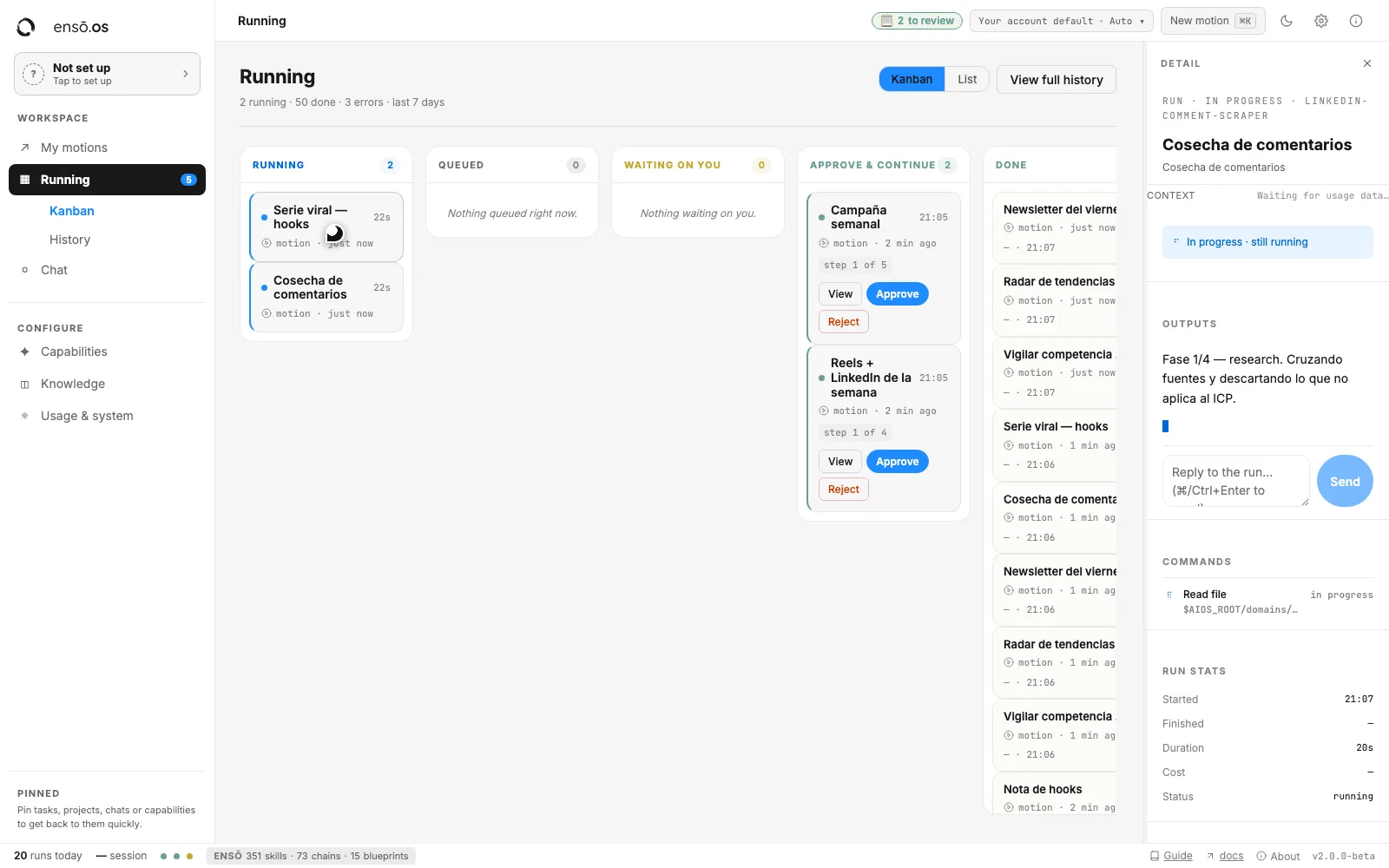
Agents aren't passive tools: they pick up tasks, report progress, and change status. Your board shows humans and agents working side by side, and you operate like you're running a team.

01

You assign

A task to an agent or a person: same gesture, same board. Name it, pick the capability, launch.

02

They execute

Full cycle: queued, picked up, running, done or failed. Blockers report themselves, on time.

CONTROL

Nothing goes out without your review.

Agents propose; people approve. Every piece of work stops at a human gate before it goes out. Reviewing is faster than doing, and judgment never leaves the team.

A board tells you where everything stands: what's running, what's waiting for review, what's queued. No asking, no chasing.

Approve & continue: nothing moves forward without your sign-off.

WHAT SHIPS INSIDE

Skills for every job. Yours to choose.

300+
ready-made capabilities
70+
complete processes

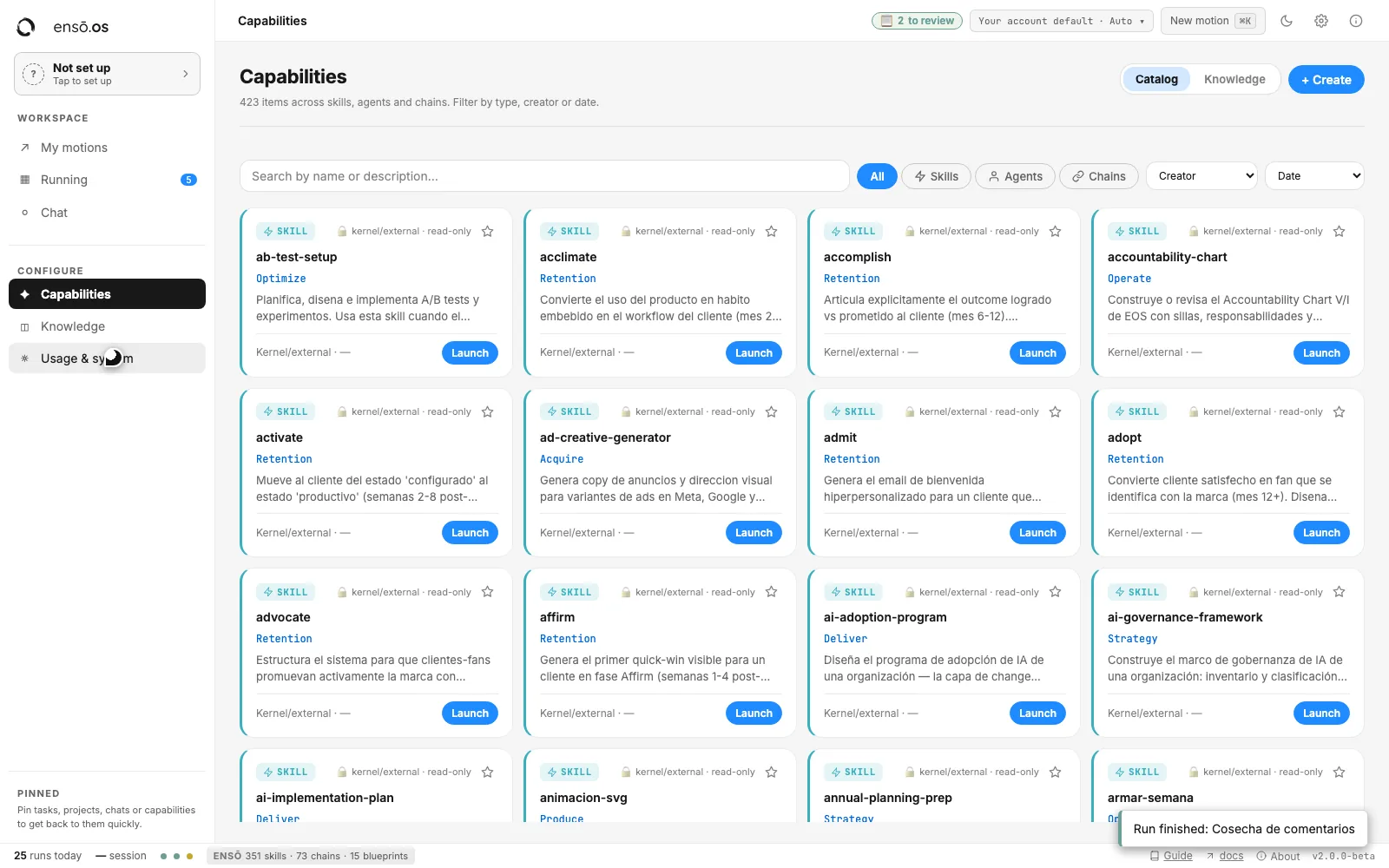
You don't start with a blank whiteboard. ENSO OS ships with a working catalog organized by the job it does (content, sales, research, operations), with preconfigured agents to run them.

The ENSO OS Capabilities catalog: skills, agents and chains organized by job, each with a Launch button

A capabilities catalog: search it, filter it and launch from it.

CHOOSE FROM THE CATALOG

Pick what fits your company.

Browse by the job you need done, activate the skill, and it runs inside your workspace. Your team launches the same capability the same way, every time.

MADE TO YOUR MEASURE

And what doesn't exist, we build for you.

Your processes aren't generic. When the catalog doesn't cover how your company works, we tailor the skill to you: your voice, your rules, your data. It joins your catalog and your whole team can launch it.

YOUR AGENT TEAM

An agent team that works
with your company's team to multiply it.

Every area of your business gets its pod: agents with a clear role, and you in command. You give one instruction; the orchestration layer moves the rest.

YOU
direction · 1 instruction
C
Brand & Content
Content
▸ Content · pod1:4
Writingin your voice
Designvisual pieces
Repurpose1 piece, 10 posts
Calendarschedules & posts
S
Sales & Closing
Sales
▸ Sales · pod1:4
Prospectingbuilds lists
Enrichmentlead data
Closingfollows up & books
Proposalsquotes
R
Research & Strategy
Research
▸ Research · pod1:4
Researchwith sources
Analysisreports
Monitorcompetitors
Synthesisconclusions
O
Operations
Ops
▸ Ops · pod1:4
Automationflows run alone
QAreviews everything
Boardwhat's missing
Supportanswers
ORCHESTRATION LAYER
A director agent calls the rest: one instruction moves everything.
CONNECTS TO THE APPS YOU ALREADY USE · NOTHING TO MIGRATE
NotionSlackGmailDriveSheetsWhatsAppHubSpotMaken8nAirtableSupabaseInstagram
YOU CHOOSE THE ENGINE · YOUR KEYS, YOUR ACCOUNT
Claude CodeCodex

Illustrative structure: you build the pods from the capabilities catalog.

THE DIFFERENCE

What one person teaches, everyone knows.

Every piece of work becomes a memory and a standardized process. Today's correction is tomorrow's process.

250+
documented working principles, searchable, not lost in a chat log

Knowledge: your team's shared memory, searchable by anyone.

One conversation and one context, shared by the team, not trapped in a personal tab.

INFORMATION GOVERNANCE

Know who uses what
and who has access to what.

Everyone on your team comes in with a role: you decide who sees which knowledge and who approves which work, transparently and traceably. One operation, not ten loose accounts: nobody starts from zero, because what one person teaches stays for the rest, and nothing is trapped in anyone's personal account.

It works where you work: your CRM, Notion, email, your documents, with your own AI provider. Your keys, your account, your choice of model.

TRAINING & GUIDANCE

You don't run it alone.

Software alone doesn't change how a company works: people running it well does. That's why ENSO OS comes with training and guidance, not just a login.

Live sessions with your team

It isn't documentation to read on your own: we sit down with the people who are going to run it, on your company's real work.

Guided implementation

For companies that want the system installed hand in hand, there's Master: 16 weeks designing the flows with your team, testing them against real work, and transferring the operation. Your team ends up running it, not depending on us.

The ENSO OS run view, the workspace the team is trained on

Placeholder: the video of a guidance session goes here.

WHY ENSŌ

It's not about working more.
It's about working less and achieving more.

All of this exists for one thing: so you can leverage your work and free up your time. So that while your business grows, you don't lose your freedom.

Tools are meant to make us free, not to make us more and more enslaved to them. A tool that needs you on top of it all day didn't give you time back: it got you another job.

That's why the ensō: the zen circle drawn in a single brushstroke, with no retouching. And that even so never quite closes: it's drawn with an opening, the space for what's still to come.

Growth is the means. The person's freedom is the end.

Mateo Folador
Vision & method
Daniel Cardona
Delivery & operations
Laura Anchico
Relationship & guidance
RESOURCES · FREE

Something you can use today.

Frameworks, templates, and tools from the ensō method. The English library is on its way: join the waitlist and we'll send it as soon as it's ready.

No account, no card. Just your email.

Before you join.

Can I use it yet? +

Access opens in batches. The waitlist is the door: join it and we'll let you know when your spot is ready.

How is this different from using ChatGPT or Claude directly? +

A chat answers you, in your tab, and forgets. ENSO OS executes work with state: the task lands on a board, an agent picks it up, reports progress, waits for your approval, and leaves the process saved for next time. You still pick the model: the OS orchestrates, it doesn't replace your AI provider.

Does this replace my team? +

No. Every piece of work passes through a human gate before it ships: agents propose, people approve. What changes is how much the same people can cover, not how many people you need.

Do I need to know how to code? +

No. You assign tasks and review results, like with a team. Agents come prebuilt and skills are added without code.

Which AI does it work with? +

Your own AI provider: you use your keys and your account. The OS orchestrates; you choose the model.

What happens to my data? Is it used to train models? +

You work with your own AI provider, with your keys and your account: the terms covering your data are the ones you already have with that provider. Inside the workspace, you decide who sees which knowledge and who approves which work.

Which tools does it connect to? +

The ones you already use: Notion, Slack, Gmail, Drive, Sheets, WhatsApp, HubSpot, Make, n8n, Airtable, Supabase, and Instagram, among others. Nothing to migrate, no stack to change to get started.

Can I build my own agents and skills? +

Yes. Turn on what already ships in the catalog, or build your own capabilities without writing code. When a process is very much yours, it gets adapted to your voice, your rules, and your data, and stays available to the whole team.

What if an agent gets something wrong? +

You see it. The board shows what ran, what failed, and what's waiting for review, with the error reported on the card. Nothing ships without your approval, and the correction you make becomes the process for next time.

Does it make sense if we're a small team? +

Yes. The smaller the team, the more it matters that nobody starts from zero: what one person figures out stays available to everyone else instead of dying in their chat history.

What if my team needs help implementing it? +

That's what our guided implementation program, Master, is for: over 16 weeks we design the flows with your team, test them, and transfer the operation. Mention it in your use case when you join the waitlist.

What happens when I sign up? +

We save your name, email, and use case, and write to you when access opens. Nothing else: signing up doesn't create an account or commit you to payment.
Stop chatting with AI.
Put it to work.

Access opens in batches. Sign up and we'll write to you when your spot is ready.

No account, no download, no card. Just your email.

Join the waitlist →